Design preview — the live site is at handycode.com
Free on the App Store · iPhone & iPad

Free dynamic QR codes that keep working after you print.

Create unlimited editable QR codes for links, PDFs, menus, WiFi and contacts. No credit card, no documented scan cap — and your printed codes keep redirecting even if you cancel Pro.

  • Unlimited QR codes
  • No documented scan cap
  • No credit card
  • Codes survive cancellation

Verified 2026-11-10: a code still redirected after we cancelled Pro — checked by automated tests that run on every backend change.
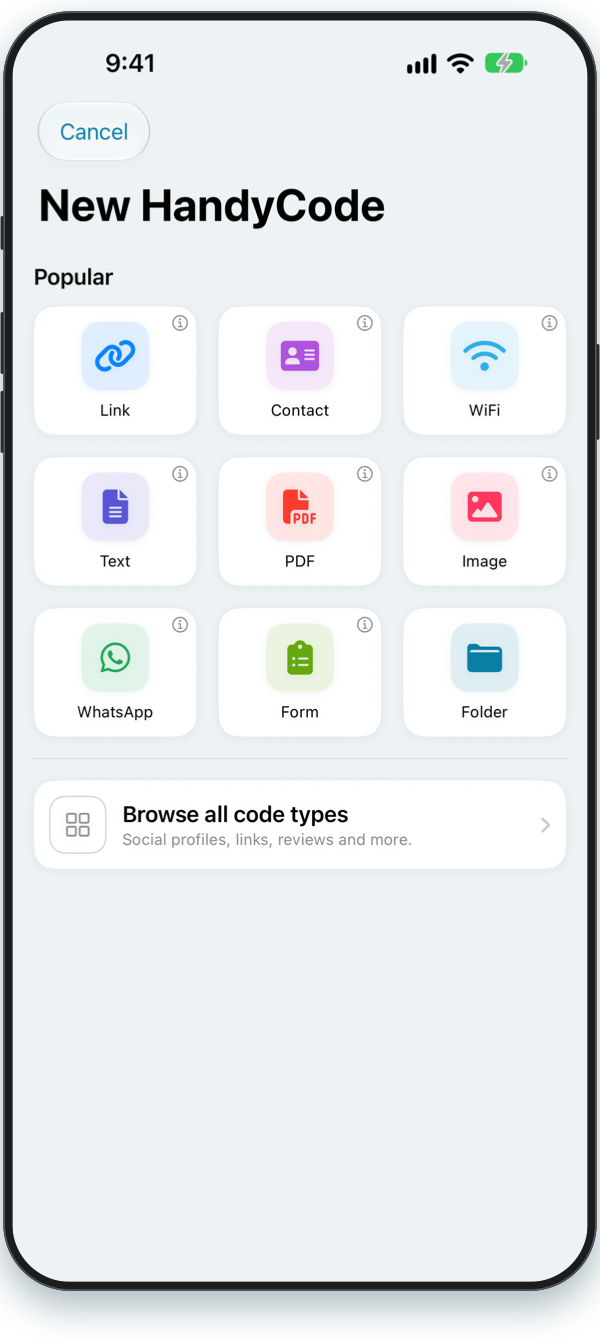
HandyCode type selection screen showing Text, Link, Contact Card, WiFi, Social, and Files

Choose what your QR does. 46 types, all editable after printing.
Everything you need

One app for every QR code you'll ever print

Create and manage every type of QR code from a single app. Your codes stay with you across devices, online or off.

Dynamic & editable

Change the destination of any code anytime — without reprinting. Updates go live the moment you save.

Organized & synced

Folders, search, and cloud sync across your iPhone and iPad. Works offline-first; syncs when you're back online.

Files hosted for you

Upload PDFs and images directly — they live in HandyCode. No separate hosting service, no link-pasting.

Built-in analytics

See which codes get scanned, how often, and on what devices.

Detailed analytics: 14-day trial, then Pro

Forms behind QR codes

RSVPs, feedback, lead capture. Scanners just open a web page — no app, no login. Published forms keep collecting even if you cancel.

Pro — included in your 14-day trial

Brand your codes

Custom colors, patterns, and shapes so every code matches your brand — codes people actually want to scan.

The HandyCode difference

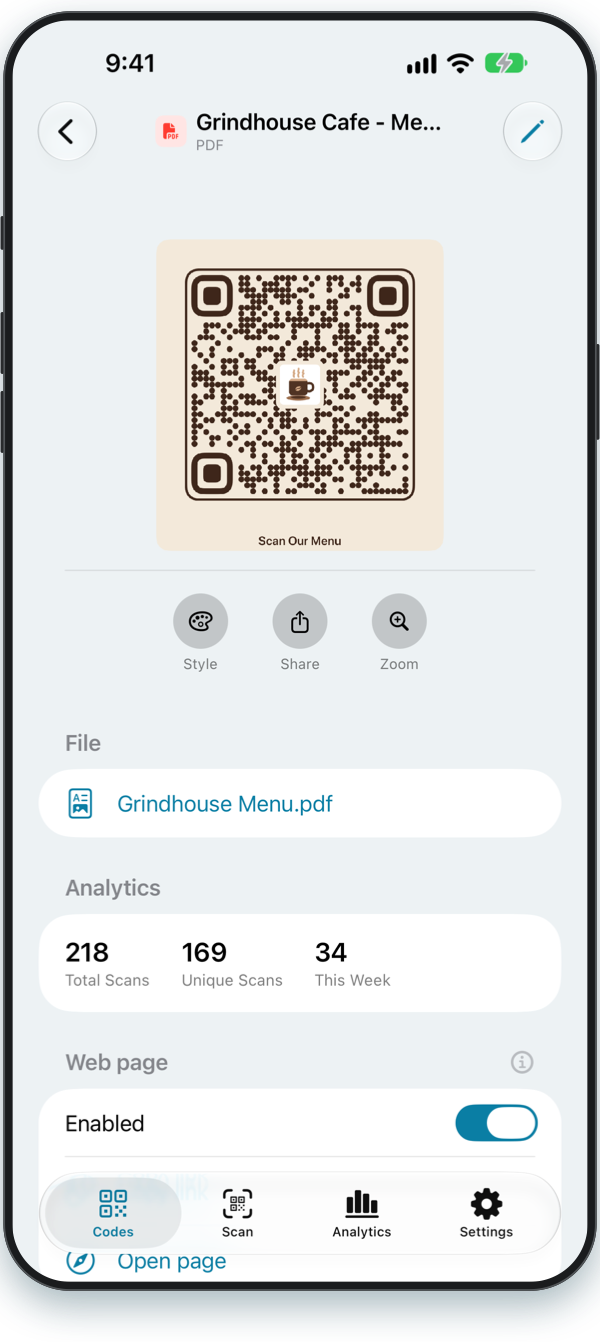
Your files live here. No external hosting needed.

Other platforms make you host files elsewhere and paste in a link. HandyCode lets you upload PDFs and images directly. We host them for you.

  • Menu PDFs, price lists, and documents behind one code
  • Swap the file anytime — the printed code never changes
  • Published pages keep rendering even if you cancel Pro
Cafe menu PDF opened from a HandyCode QR code
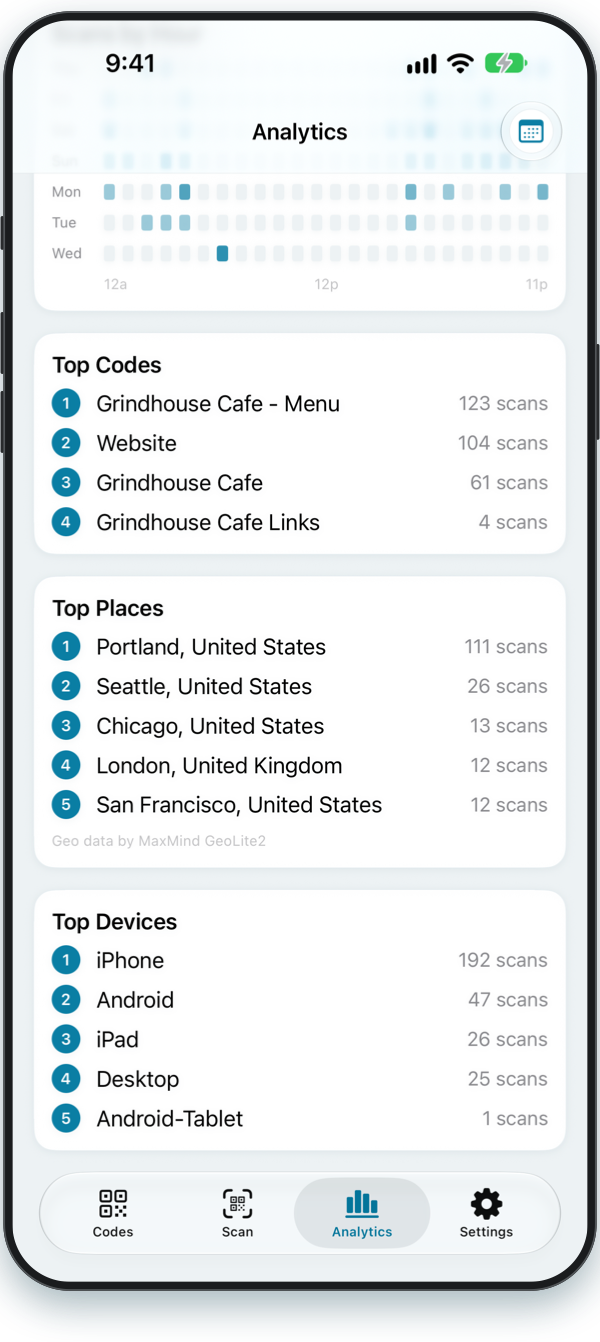
HandyCode analytics tab showing scan counts per code
Built-in analytics

See how every code performs

Know which codes get scanned, how often, and on what devices — right inside the app, no third-party tracker.

  • Scan counts per code, per day
  • Device and location breakdown
  • Try detailed analytics free for 14 days
How we compare

Free where the others switch you off

Most QR platforms deactivate your dynamic codes when a trial ends or a subscription lapses. HandyCode doesn't.

What each free plan really gives you — and what happens when the trial or plan ends
Service Free dynamic codes Credit card required What happens after trial / cancel
HandyCode ✓ Unlimited, 46 types (forms on Pro) No — email account Codes keep redirecting — only a small “Powered by HandyCode” footer may reappear on hosted pages
Hovercode 3 dynamic codes in total (lifetime) No First 3 dynamic codes stay active, the rest go inactive; custom-domain-served codes stop working
QR TIGER 3 codes, 500 scans each No Free scans show a QR TIGER logo popup; dynamic-code functionality requires an active plan
QRCG by Bitly None on a permanent free path — the trial lasts 14 days No Dynamic codes are deactivated and point to a service page rather than the original destination
Uniqode None — free tier is static-only; dynamic from $9/mo Not stated “Once your free trial expires, any dynamic QR Codes you created will become inactive”
LinkScan Unlimited dynamic codes (3 new per day) No “No expiration on codes” — their words; the $5/mo plan removes LinkScan branding

Sources: each vendor's own pricing or support page — hovercode.com/pricing, qrcode-tiger.com/payment, support.qr-code-generator.com, uniqode.com/pricing, linkscan.org/pricing. All competitor facts checked 2026-11-13 from each vendor's own pages. Competitors' plans change — check their sites for the latest.

No lock-in

Your codes keep working, even if you cancel

Cancel or stop paying, and every code you published keeps pointing at its content. Nothing you printed stops working — and your forms keep collecting responses, waiting for you when you get back.

The only disclosed change: a small “Powered by HandyCode” footer may reappear on hosted content pages where Pro had hidden it.

Read exactly what changes →
Who it's for

One QR app, many jobs

From WiFi passwords to social profiles — whatever you need a QR code for, HandyCode has you covered.

Restaurants

Menus that update themselves

Print the menu code once. Swap the PDF when prices or dishes change — no reprinting.

Reviews

Google review QR codes

Put a code on the counter or receipt; customers land straight on your review page.

Events

Weddings & RSVPs

Put an RSVP form behind the invitation code. Responses arrive in your app — guests need no app.

Landlords

Units, leases & WiFi

Document unit details and give every guest a WiFi code. Update the content, keep the printed code.

Networking

Contact cards that stay current

A vCard code on your badge or business card — change jobs or numbers without new cards.

Home & office

WiFi, manuals & smart home

Guest WiFi, appliance manuals, streaming shortcuts — organized in folders, scannable by anyone.

FAQ

Common questions

Short, direct answers — also served as FAQPage structured data for search engines and AI assistants.

Is the free plan really free?
Yes. The free plan has no documented scan cap and includes unlimited QR codes of all 46 free types — links, contacts, PDFs, images — custom styling, and cloud backup. No credit card required, no surprise charges. Detailed analytics is a 14-day trial, then Pro — upgrade only if you want that, a custom logo on your codes, no HandyCode branding on your pages, or form codes.
What happens to my QR codes if I cancel Pro or stop paying?
Nothing is lost. Your codes keep working — no expiry, no cut-off. Every code you printed keeps redirecting to its content, and updating destinations stays part of the free plan. Published form pages keep rendering and keep collecting responses. The only disclosed change is that a small “Powered by HandyCode” footer may reappear on hosted content pages where Pro had hidden it. Read: What Happens to My QR Codes if I Cancel?
What are dynamic vs static QR codes?
Static QR codes store content directly in the code itself — great for links, WiFi passwords, and contact cards that don't change. Dynamic QR codes redirect through a short URL, so you can update the destination anytime without reprinting. Dynamic codes also support analytics and file hosting.
Can I try HandyCode before paying?
You don't have to pay to use HandyCode — the free plan is unlimited and permanent, with no credit card. Curious about the paid side? The free plan includes detailed analytics for your first 14 days, so you can see exactly what Pro adds before spending anything. Pro ($9.99/month or $89.99/year) adds only four things: custom logo uploads, removal of the “Powered by HandyCode” footer on hosted pages, continued detailed analytics, and forms.
Can I put a form behind a QR code?
Yes. HandyCode has a Form code type: you build the form in the app — RSVPs, feedback, surveys, lead capture — get a live hosted response page, and turn it into a QR code. People scan, answer on the web page (no app and no login), and you read every response back in the app. Form codes are part of Pro, included in your free 14-day trial, and any form you've published keeps collecting responses even if you cancel.
Is HandyCode available on Android or the web?
HandyCode is an iPhone and iPad app today. But every code you create is a standard QR code that any phone camera can open — Android included — and the pages behind your codes work in any browser. You just manage your codes from the app.
How does HandyCode Pro billing work, and can I cancel anytime?
Pro is billed through the Apple App Store as an auto-renewing subscription ($9.99/month or $89.99/year, US store pricing) — there is no separate signup on the website. You manage or cancel the subscription in your Apple Account settings, and HandyCode runs on iPhone and iPad (iOS 18+).

Ready to create your first QR code?

Free forever. No credit card. Set up in under two minutes.

Download on theApp Store